Bangladeshi auction site

360 Desktop 2.0  

Posted by T ZAMAN in


360 Desktop is a virtual desktop application that creates a "panoramic workspace" extending across multiple screens. It behaves as a scrollable desktop where you could travel from one side and into the other. It also introduces the ability to embed widgets on the new desktop that clip content off the web such as RSS feeds and videos.

Imagine a desktop environment that is spread across multiple screens consisting of a single, panoramic wallpaper image, and where you can scroll smoothly across the new desktop and place both icons and applications anywhere you like.

360 Desktop tries to deliver exactly this with some success. It provides a never-ending desktop that scrolls smoothly and creates the feeling of an expansive workspace with a lot of space for your windows, apps, and icons. However, the pre-release beta tested here still has some major kinks that need to be ironed out, high on the list of which is it?s support for embedded internet widgets that still feels rudimentary and left me wishing that I could simply switch it off.


Links: Homepage
Download: Rapidshare - Mediafire

Share/Save/Bookmark

Get a Prepaid Visa Card - No credit check. Quick approval. Shop online, pay bills, use ATMs


Read more...

Comments

TuneUp Utilities 2009 v.8.0.3100.31 Full  

Posted by T ZAMAN in


If you want to keep your PC in good condition and running as smoothly as the very first day you switched it on, you've got two options: either you download a dozen different system optimization apps or you just use TuneUp Utilities 2009, a nice piece of software that has turned into an essential maintenance toolkit for your PC.

The new version of TuneUp Utilities brings many exciting new features that make the program even better. It has not only improved many of the tools included in previous editions, but has also added new ones such as a Start page that provides you with quick and easy access to the program's main functions and the TuneUp Speed Optimizer, with which you can optimize and tweak different elements on your system for a better overall performance.

The first thing you see when launching TuneUp Utilities 2009 is a nagging window, a short message reminding you that this is not free software and that you have a 30-day trial period. It's a bit of a nuisance because it appears every time you it, but no big deal.

TuneUp Utilities 2009 features a nicely-designed interface that makes it easier to use, with tools classified into several categories and direct links to the most frequently used actions. Featured tools in TuneUp Utilities range from customizing the appearance of Windows to editing the Registry and covering many important aspects of your system. You'll be able to optimize general performance, gain disk space by erasing junk files and even recover those documents you've deleted by accident. TuneUp Utilities 2009 can also generate a highly detailed report on the state of your PC. The good thing is that, no matter how many changes you make, you can always go back to your PC's previous state thanks to TuneUp Rescue Center.

TuneUp Utilities 2009 adds a new shortcut to the Desktop named "1-Click Maintenance", which enables you to perform a quick maintenance check-up and which has also been optimized in TuneUp Utilities 2009. This is certainly a very handy tool that should probably be run every week as a periodic maintenance task.

TuneUp Utilities gathers pretty much all the maintenance and optimization tools you need into one efficient, easy-to-use application. You couldn't ask for more.


Links:
Homepage
Download:
Rapidshare


Share/Save/Bookmark

Get a Prepaid Visa Card - No credit check. Quick approval. Shop online, pay bills, use ATMs


Read more...

Comments
Proxy Switcher Pro v.3.9.0.4059  

Posted by T ZAMAN in ,


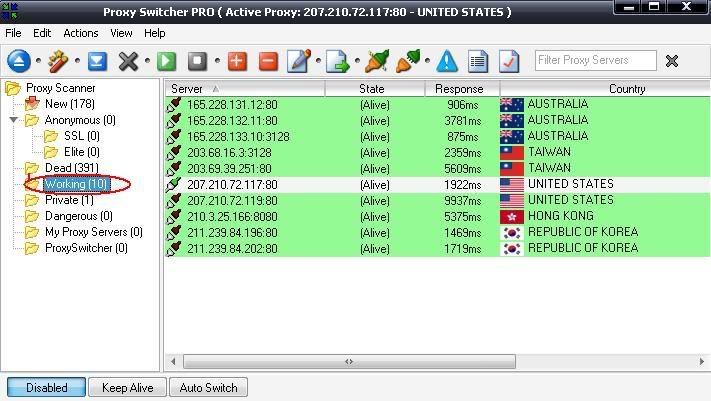
Proxy Switcher Pro v3.9.0 b4059 - change proxy settings on the fly. Different internet connections do often require completely different proxy server settings and it?s a real pain to change them manually. Proxy Switcher offers full featured connection management solution. This includes flexible proxy server list management, proxy server tester and anonymous surfing capabilities.
Opportunities of the program:
Change of a proxy "hurriedly"
Loading of the list of addresses of a proxy of servers from the Internet
Export, import of the list of a proxy files
Automatic switching of a proxy for anonymous navigation
Works with IE, Firefox, Opera, etc.
Check of availability (testing of a proxy-server for working capacity)
Loading of the list of anonymous proxies


Links: Homepage
Download: Rapidshare

Share/Save/Bookmark

Get a Prepaid Visa Card - No credit check. Quick approval. Shop online, pay bills, use ATMs


Read more...

Comments

How to Get "Certificate" From NASA, Mozilla Firefox  

Posted by T ZAMAN in ,


HERE'S HOW ... ↓↓↓

[Certificate From Mozilla Firefox]
http://www.spreadfirefox.com/en-US/worldrecord/certificate_form

[Certificate From NASA]
http://lro.jhuapl.edu/NameToMoon/index.php

Share/Save/Bookmark

Get a Prepaid Visa Card - No credit check. Quick approval. Shop online, pay bills, use ATMs


Read more...

Comments

HIDE YOUR DATA ON IMAGE  

Posted by T ZAMAN in

Original image [14.92 KB]:


Modified image [2408 KB](Include data):


Both of them can open as Image. But, Modified image had data in that. This's the secret way to hide your data. So, all antivirus or antispyware can not detect virus !

Here is HOW ...


Step1: Copy your data and image file to the same Folder.
Step2: Start > Run > CMD > CD to the folder that contain data, image files
Type this command:

copy /b image_file.jpg +data_file.rar image_file.jpg


Completed ! But, whenever you want to open your data file, rename your image file to data file name.


Share/Save/Bookmark

Get a Prepaid Visa Card - No credit check. Quick approval. Shop online, pay bills, use ATMs


Read more...

Comments
Delete email accounts permanently  

Posted by T ZAMAN in , ,

After cracked some google, hotmail, yahoo ... email accounts (Those accounts had Rapidshare security code), you want 2 delete (remove) them but don't know HOW TO, Please follow the instructions here to initiate the deletion of your account.


Gmail:
You can delete Gmail from your Google Account at any time. If you're sure you won't use Gmail in the future, please follow these steps to delete it:
1. Click Settings at the top of any Gmail page, and open the Accounts tab.
2. Click Google Account settings.
3. Click Edit next to My products on the right side.
4. Click Delete Gmail Service.

https://www.google.com/accounts/EditPasswd?hl=en&service=mail

Hotmail:
http://mail.live.com/mail/CloseAccountConfirmation.aspx

To close a free Hotmail account, sign in to Hotmail using the account. Click Help, and then follow the instructions in the topic named "Close your MSN Hotmail account."

Yahoo:
https://edit.yahoo.com/config/delete_user

To remove your entire account, please visit our Account Deletion page. You will be asked to sign in or verify your password for the account you wish to remove. Please be sure to read the next page carefully, as important information about your account and account information is included. You can then confirm the deletion of your account.

Change PW:
https://edit.yahoo.com/config/change_pw?.src=

Azet.sk
http://moje.azet.sk/ZmenaHesla.phtml?&i9=8ee7fec3b399&from=emailnew.azet.sk

Zoznam.sk
http://mail.zoznam.sk/Session/1121387-beIEFkQgjvX2RWvHwT7p-jizepbo/frameset.wssp?

Web.de
https://kundencenter.web.de/xml/config/SecurityDataEdit

Freenet.de
https://kundencenter.freenet.de/customercenter/PersonalData/updatePassword/index.jsf

Gmx.net
https://service.gmx.net/de/cgi/g.fcgi/config/password?

T-Online.com
https://selfservice.t-online.com/stc/passwd/chpwd.cgp?tld=de&pwdtype=web&skinid=ngcs&wdycf=/sfs/index/index_ng.cgp%3Fskinid%3Dngcs

https://selfservice.t-online.com/stc/passwd/chpwd.cgp?tld=de&pwdtype=pop&skinid=ngcs&wdycf=/sfs/index/index_ng.cgp%3Fskinid%3Dngcs


Share/Save/Bookmark

Get a Prepaid Visa Card - No credit check. Quick approval. Shop online, pay bills, use ATMs


Read more...

Comments
Easy step to combine rapidshare points  

Posted by T ZAMAN in ,

Your Premium acc prepare to expire ?
Your Collector acc is not important ?

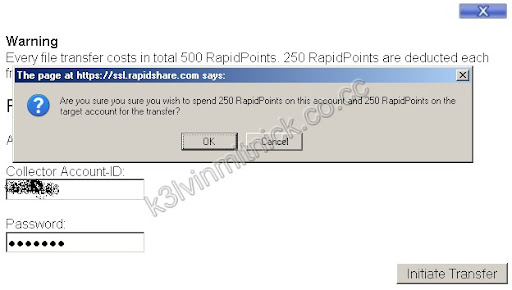
You can combine all kind of accounts (Pre <--> Col) very fast by this way (Very useful):


1. You must have at least 255 points in your acc
2. Your acc must not active (not lock)
3. Login your Pre acc > Click to "Transfer all files to Collector account"


4. Type your Col acc info (ID, pw) > Click to "Initiate transfer" > OK


Share/Save/Bookmark

Get a Prepaid Visa Card - No credit check. Quick approval. Shop online, pay bills, use ATMs


Read more...

Comments
Free Web Hosting
http://in.boobies.com/c/fmp.cgi/8001/2165461.yu567fsdfed/A

SEARCH THE WEB

PLEASE READ THIS

This blog is intended for educational use. All data presented on this website were gathered from outside sources and no files are actually hosted in this website. The owner of this site shall not be held responsible for how the site visitors use the information provided here.

DONATE NOW

Top Commentators

Widget by Blogger Widgets

Recent Posts

Archives

Subscribe

BlogUpp!

FEEDJIT Live Traffic Feed

NeoCounter